Why Tattoo Photo Editing is Trending
In today’s digital world, visual content plays a huge role in engagement. Tattoo edits offer a unique and bold look that stands out on platforms like Instagram and Pinterest. People love experimenting with temporary tattoo visuals before committing to real tattoos, making this editing style both practical and fun.
Choosing the Right Editing Tools
Selecting the right app or software is the first step in creating stunning tattoo edits. Popular tools like Photoshop, Lightroom, and mobile apps such as PicsArt and Snapseed provide advanced features for blending, shading, and layering. The right tool helps achieve a more natural and professional finish.
Selecting the Perfect Tattoo Design
The choice of tattoo design significantly impacts the final look. Whether you prefer tribal patterns, minimalist art, or intricate mandalas, ensure the design matches the tone of the photo. High-resolution images work best as they maintain clarity even after editing.
Understanding Placement and Perspective
Placement plays a crucial role in making the tattoo look realistic. Consider the body’s natural curves and angles while positioning the design. Aligning the tattoo with muscles or contours enhances authenticity and creates a more believable effect.
Blending Techniques for Realism
Blending is the key to making a tattoo look like part of the skin. Adjusting opacity, using blending modes like multiply, and fine-tuning shadows help integrate the tattoo seamlessly. This step ensures the design does not appear pasted but naturally embedded.
Adjusting Skin Texture and Tone
Matching the tattoo with the skin tone is essential for realism. Slight adjustments in brightness, contrast, and color balance help the tattoo blend smoothly. Adding subtle skin texture over the tattoo can further enhance the natural look.
Using Shadows and Highlights Effectively
Shadows and highlights bring depth to the tattoo edit. By carefully adding shadows around the edges and highlights where light hits, you can create a three-dimensional effect. This makes the tattoo appear more lifelike and visually appealing.
Enhancing Details with Filters and Effects
Filters can add a dramatic touch to your tattoo edits. Vintage tones, cinematic color grading, or subtle grain effects can elevate the overall image. However, it’s important to use effects sparingly to avoid overpowering the tattoo design.
Common Mistakes to Avoid
Many beginners make mistakes like incorrect placement, over-editing, or ignoring lighting consistency. Avoid stretching the design unnaturally or using low-quality images. Paying attention to details ensures your tattoo edits look clean and professional.

Prompt:
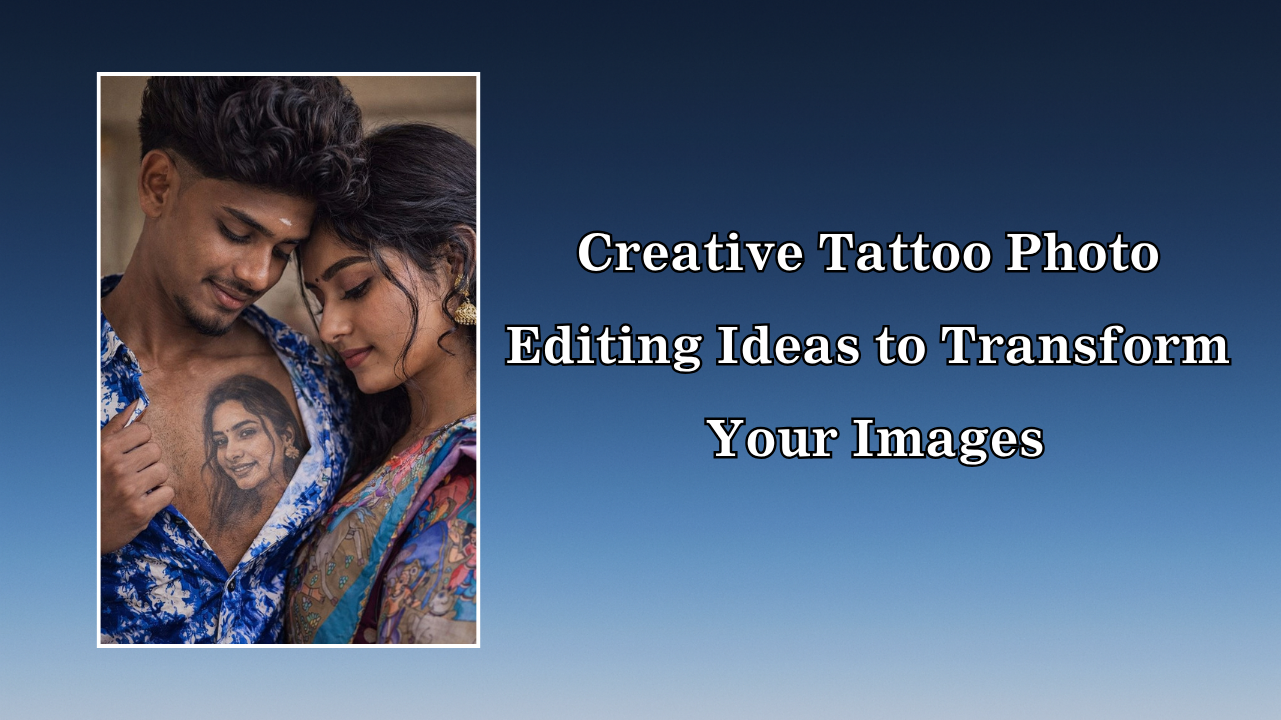
Ultra-realistic emotional couple portrait, 8K, cinematic photography, natural skin texture with visible pores.A young Indian couple standing very close indoors. The man has MY EXACT FACE and MY EXACT HAIRSTYLE from my uploaded image (match hairline, volume, direction, texture, no changes). He slightly tilts his head down with a soft emotional smile and gently opens the left side of his shirt collar using one hand.On his chest, there is a highly realistic black-and-grey tattoo of a smiling woman’s face, designed like a professional tattoo artist work — detailed shading, natural ink spread, skin integration, slight redness and healed texture, perfectly following chest contours (NOT transparent, NOT glowing, NOT edited overlay — it must look permanently inked on skin).The woman stands close to him on the right side:
Conclusion and Final Thoughts
Tattoo photo editing is a creative and exciting way to transform ordinary photos into eye-catching visuals. With practice and attention to detail, you can achieve highly realistic results that impress viewers. Whether you are editing for fun or professional use, mastering this skill opens up endless artistic possibilities.